Sit-Stand Desks for the Office: A Commercial Buyer's Guide
Austin Frantell · 7 min read · March 17, 2026
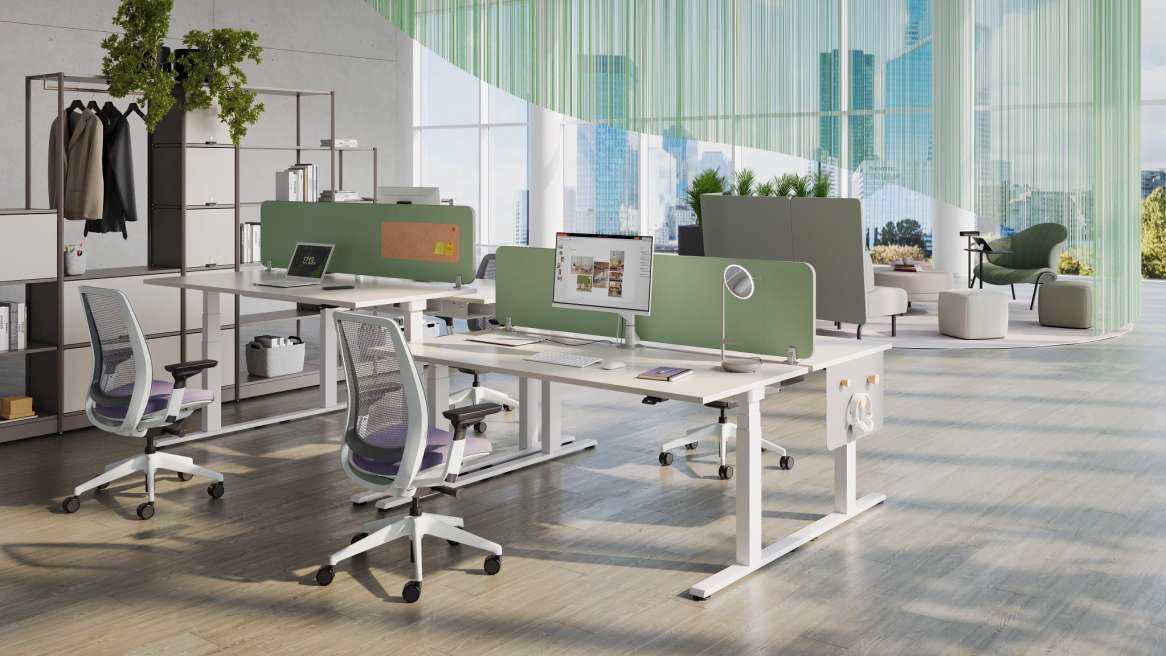
The conversation about sit-stand desks has shifted. Five years ago, companies debated whether to offer them at all. Today, the question is which type, which brand, and how to deploy them at scale without blowing the budget.
But most of the information out there is written for consumers buying one desk for a home office. Specifying height-adjustable desks for a 200-person commercial deployment is a completely different exercise. The evaluation criteria, price points, and failure modes are not the same.
Adjustment Types: Electric vs. Pneumatic vs. Crank
The mechanism that moves the desk up and down is the most fundamental specification decision. Each type has distinct trade-offs in a commercial environment.
Electric (Motor-Driven)
The dominant choice for commercial deployments, and for good reason. Electric desks use one or two motors to drive the height adjustment, operated by a control pad mounted under the worksurface.
Advantages:
- Smooth, effortless adjustment — critical for encouraging actual use
- Programmable height presets (most models store 3-4 positions)
- Can handle heavy loads without user effort
- Consistent speed and performance across the full range
Considerations:
- Requires power at every station (floor boxes or wall outlets)
- Motors are a potential failure point over 8-15 years of daily use
- Higher cost than manual alternatives
Pneumatic (Gas-Assisted)
Pneumatic desks use a gas cylinder — similar to a chair mechanism — to assist with height adjustment. The user typically squeezes a lever and pushes the surface up or pulls it down.
Advantages:
- No electrical connection required
- Fewer mechanical components to fail
- Lower cost than electric
Considerations:
- Requires physical effort to adjust, which reduces usage frequency
- Weight capacity limitations — heavy monitor arms and multiple displays can exceed the gas cylinder's capacity
- Less precise height positioning
Manual Crank
A hand crank adjusts the desk height through a gear mechanism. These are the lowest-cost option but are rarely specified for commercial environments. Cranking a desk from sitting to standing takes 30-60 seconds of sustained cranking. In practice, users don't bother, and the desk becomes a fixed-height surface at whatever position was last set.
The verdict for most commercial projects: Electric, with dual motors for desks supporting heavy loads or wide worksurfaces.
Single Motor vs. Dual Motor
This distinction matters more than most buyers realize.
Single motor bases use one motor and a mechanical linkage to drive both legs. They're adequate for lighter-duty applications with standard 48"-60" worksurfaces and moderate loads (under 150 lbs).
Dual motor bases have an independent motor in each leg. They offer higher weight capacity (200-350 lbs), faster adjustment speed, better stability at standing height, and more reliable long-term performance. For commercial deployments where desks will support dual monitors, a monitor arm, a laptop, and personal items, dual motor is the right call.
The price difference between single and dual motor is typically $100-$200 per desk. On a 200-desk deployment, that's $20,000-$40,000 — but the reliability and user satisfaction difference usually justifies it.
Weight Capacity: More Than a Spec Sheet Number
Manufacturer-stated weight capacities are tested under ideal conditions. In real-world commercial use, you should target a desk with a rated capacity at least 30% above your expected load. Why?
- Monitor arms create leverage forces that stress the mechanism beyond their static weight
- Users lean on desks, set heavy bags down, and occasionally sit on them
- Capacity degrades slightly over years of daily cycling
A desk rated at 250 lbs with an actual load of 80-100 lbs will perform reliably for years. A desk rated at 150 lbs carrying 120 lbs of equipment will feel sluggish, struggle at standing height, and wear out its motors faster.
Programmable Presets: Non-Negotiable for Commercial
If people have to hold a button and eyeball their preferred height every time they adjust, they'll stop adjusting. Programmable presets — where a user saves their sitting and standing heights and recalls them with one touch — are the single biggest factor in whether employees actually use the sit-stand feature.
Most commercial-grade electric desks include a control pad with 3-4 preset buttons. Some include a small LED display showing the current height. A few higher-end models include Bluetooth connectivity for app-based control and usage tracking.
For commercial deployments, insist on at least 3 programmable presets per desk.
Cable Management: The Unsexy Essential
This is where consumer desks and commercial desks diverge most visibly. A height-adjustable desk needs to accommodate cable movement through a 12-18 inch vertical range — and in a commercial environment with power, data, monitor cables, and phone connections, that's a lot of cable to manage.
Solutions that work:
- Cable trays mounted under the worksurface to contain excess cable length
- Cable chains (articulating cable carriers) that manage the path from desk to floor
- Integrated power modules built into the worksurface with USB and outlet access
- Wireless peripherals to reduce cable count (though this is limited in many commercial IT environments)
Solutions that don't work:
- Loose cables hanging from desk to floor (trip hazard, looks terrible)
- Cables zip-tied to the desk leg (restricts movement, eventually breaks)
Budget $30-$75 per station for proper cable management accessories if they're not included with the desk. It's a small cost that prevents a messy, unprofessional deployment.
Retrofit Converters vs. Full Desks
If you have existing desks in good condition, sit-stand converters (desktop risers that sit on top of a fixed desk) can add height adjustability without replacing the entire desk.
Converters make sense when:
- Existing desks are high-quality and relatively new
- Budget is constrained
- You want to pilot the concept before a full rollout
Full sit-stand desks are better when:
- You're furnishing a new space or doing a full refresh
- Ergonomics and worksurface area are priorities (converters reduce usable desk space)
- You want a clean, integrated aesthetic
- You're planning a long-term installation (converters have shorter useful lives)
Converters range from $200-$600. They're a legitimate option for retrofitting, but they're not a substitute for proper height-adjustable desks in a new buildout.
Commercial-Grade vs. Consumer Brands
This distinction is critical for commercial buyers. The consumer market is flooded with direct-to-consumer sit-stand desks priced at $300-$600 — and they're fine for home offices. But they're not engineered for the demands of a commercial environment.
Commercial-grade brands (Steelcase, Herman Miller, Haworth, HON, Knoll) build desks designed for 10-15 years of daily cycling by different users, backed by commercial warranties and supported by dealer service networks. They also integrate with commercial cable management, power, and panel systems.
Consumer brands are designed for a single user in a home environment, typically with shorter warranties (3-5 years), lighter-duty components, and no dealer support infrastructure for large deployments.
Typical cost ranges:
- Consumer-grade electric sit-stand desk: $300-$700
- Mid-market commercial desk (HON, SitOnIt): $600-$1,200
- Premium commercial desk (Steelcase, Herman Miller): $1,200-$2,500
- Retrofit converter: $200-$600
Making the ROI Argument
If you need to justify the investment to leadership, frame it around these data points:
- Recruitment and retention. Sit-stand desks are now an expected amenity for knowledge workers, similar to good ergonomic seating. Not offering them is increasingly a competitive disadvantage.
- Health and comfort claims. Research supports that alternating between sitting and standing reduces discomfort and fatigue. Avoid overstating the health benefits — the science on long-term health outcomes is still mixed.
- Relatively low incremental cost. The premium for a sit-stand desk over a fixed desk is often $400-$800 per station. Amortized over 10 years, that's $40-$80 per year per employee.
Use the budget estimator to model the cost impact of sit-stand desks across your full project.
The Bottom Line
Sit-stand desks are a smart investment for most commercial office environments — but specifying them well requires attention to mechanism type, motor configuration, weight capacity, cable management, and brand quality that goes well beyond reading consumer reviews.
Choose electric, dual-motor desks from commercial-grade manufacturers. Insist on programmable presets. Budget for cable management. And buy for the load you'll actually put on the desk, not the minimum spec sheet number.
Your employees will either use these desks daily for the next decade or abandon the feature after a month. The specification decisions you make now determine which outcome you get.
Working on a project right now?
Request pricing or more information about furniture and project services. Share your scope, location, and timeline, and Austin’s team will follow up.
Request a Quote or Information →Related Articles
How to Choose a Commercial Furniture Dealer: 8 Questions to Ask
The right dealer is the difference between a smooth project and a costly disaster. These eight questions separate great partners from risky ones.
7 min readBuying GuidesHow to Negotiate Office Furniture Pricing Like a Pro
List price is just the starting point. Here's how experienced buyers negotiate commercial furniture pricing — and where pushing too hard can backfire.
7 min readWorkspace PlanningSolving the Noise Problem: Acoustic Solutions for Open Offices
Practical acoustic treatments and furniture solutions for noisy open office environments.
7 min read